Updated: September 20, 2026 Author: Sajjad Farajollahi Primary intent: lead intake automation / CRM integration / form reliability Audience: service businesses, agencies, operators and technical teams responsible for website enquiries and sales handoff
The short answer#
A website form becomes a revenue system only when a valid submission is accepted, recorded once, assigned to an owner, acknowledged, observable through failures and recoverable without asking the prospect to submit again. Sending an email after a form submission is a notification mechanism, not a complete lead-intake architecture.
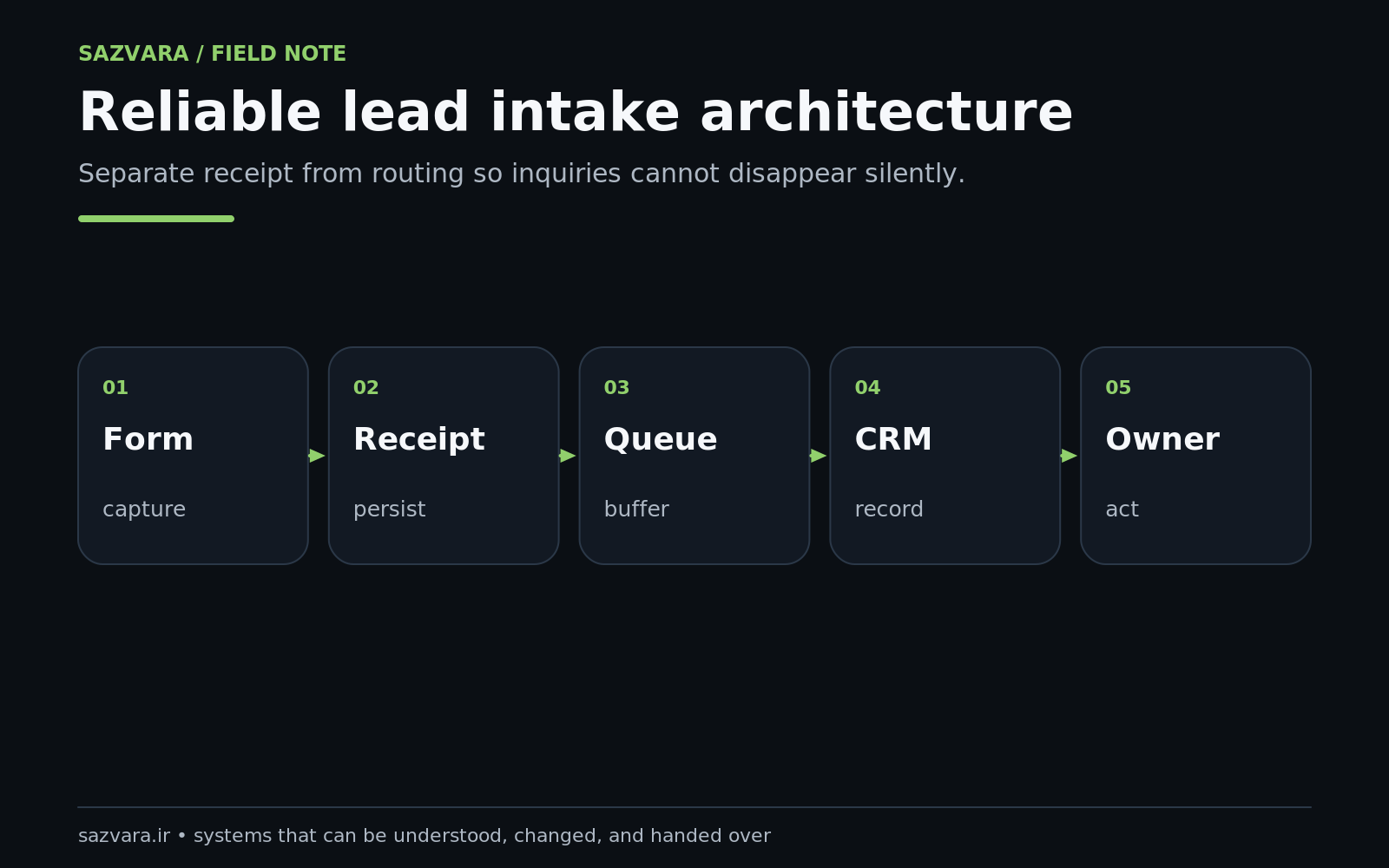
The reliable pattern is: design the form for completion, validate untrusted input on the server, create a durable receipt, generate an idempotency key, persist the lead in a system of record, apply routing rules, notify the owner, measure response time, and maintain an exception queue for anything that does not complete. W3C guidance emphasizes simple, clearly labelled forms and notes that client-side validation alone is not sufficient for security (W3C forms tutorial, W3C validation guidance). OWASP likewise recommends validating untrusted input as early as possible in the data flow (OWASP Input Validation Cheat Sheet).
The key design principle is simple: the browser's success message must not be the only evidence that the business received the enquiry.
Why "the form works" is an incomplete requirement#
A marketing team usually tests a form by submitting it and checking whether an email arrives. That proves one path under one set of conditions. It does not prove the system is reliable.
Consider the chain behind a typical enquiry:
- visitor loads the page;
- browser validates required fields;
- request reaches the site;
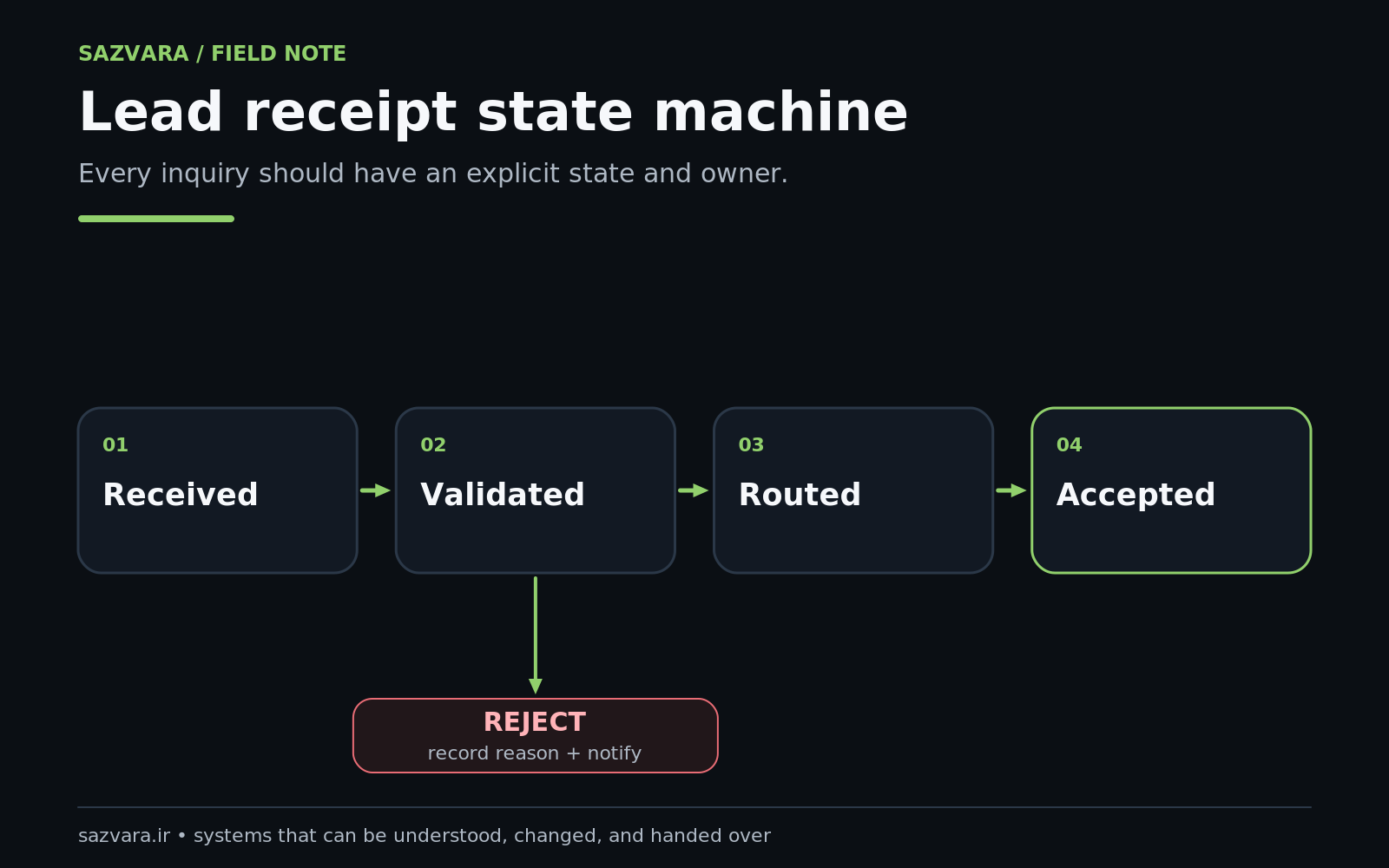
- server accepts or rejects the payload;
- spam/abuse controls run;
- data is transformed;
- CRM/API call occurs;
- duplicate rules may run;
- routing logic assigns ownership;
- notification is sent;
- salesperson responds;
- reporting attributes the lead correctly.
A failure anywhere after step three can produce the worst possible state: the prospect sees "Thank you" while the business has no usable lead record.
That is why lead intake should be treated as a transaction with observable stages rather than as a single front-end feature.
Define the system of record first#
Before choosing Zapier, Make, n8n, a WordPress plugin or custom code, decide where a lead becomes authoritative.
Possible systems of record include:
- a CRM lead/contact object;
- a ticketing or service-management queue;
- an internal database;
- a durable message queue followed by downstream CRM creation;
- a form platform with a reliable submission store, if that platform is deliberately treated as the primary record.
The system of record answers a critical recovery question: If every notification fails, where can the business still find the enquiry?
If the answer is "nowhere," the architecture is fragile.
A confirmation email should therefore be downstream of durable receipt, not the only evidence of receipt.
Start with form usability, not back-end complexity#
A reliable pipeline begins with a form people can complete. W3C's forms guidance recommends asking only for information required to complete the transaction or process, because unnecessary complexity increases abandonment (W3C Forms Tutorial). It also recommends explicit labels associated with controls so people and assistive technology can understand the form (W3C Labeling Controls).
For a service-business diagnostic form, a strong starting set might be:
- name;
- work email;
- company;
- website or system URL;
- concise problem description;
- desired outcome;
- urgency or timeframe.
Do not collect fifteen fields merely because the CRM supports them. Qualification data can be gathered after the business has safely received the enquiry.
A practical UX test#
Ask someone unfamiliar with the page to submit a realistic enquiry on a phone. Observe whether they can answer each field without asking what it means. Then test keyboard navigation, labels, errors and the confirmation state.
This is not separate from revenue performance. A theoretically perfect CRM pipeline is useless if the form itself creates unnecessary friction.
Validate twice: for the user and for the system#
HTML validation improves the immediate user experience, but it is not a security boundary. MDN explicitly notes that browser constraint validation does not remove the need for server-side validation because requests can be modified or created outside the normal form UI (MDN Constraint Validation). W3C's validation tutorial makes the same point.
Server-side validation should check things such as:
- required fields actually exist;
- lengths are bounded;
- expected field types are respected;
- URLs and emails are normalized carefully;
- enumerated values match allowed choices;
- unexpected fields are ignored or rejected according to policy;
- payload size is limited;
- abuse controls do not silently discard valid enquiries.
OWASP's input-validation guidance recommends allow-list style validation where appropriate and validation as early as possible in the data flow (OWASP Input Validation).
The goal is not to reject every imperfect prospect. It is to stop malformed or hostile input from entering downstream systems while giving real users useful correction messages.
Create a durable receipt before doing expensive downstream work#
Once a payload is valid, create a durable receipt before depending on external APIs.
That receipt can be a database row, queue message or other persistent record containing:
- internal submission ID;
- normalized contact fields;
- source page/campaign metadata;
- timestamp;
- consent fields where applicable;
- payload version;
- processing status;
- attempt count;
- assigned downstream record ID when completed.
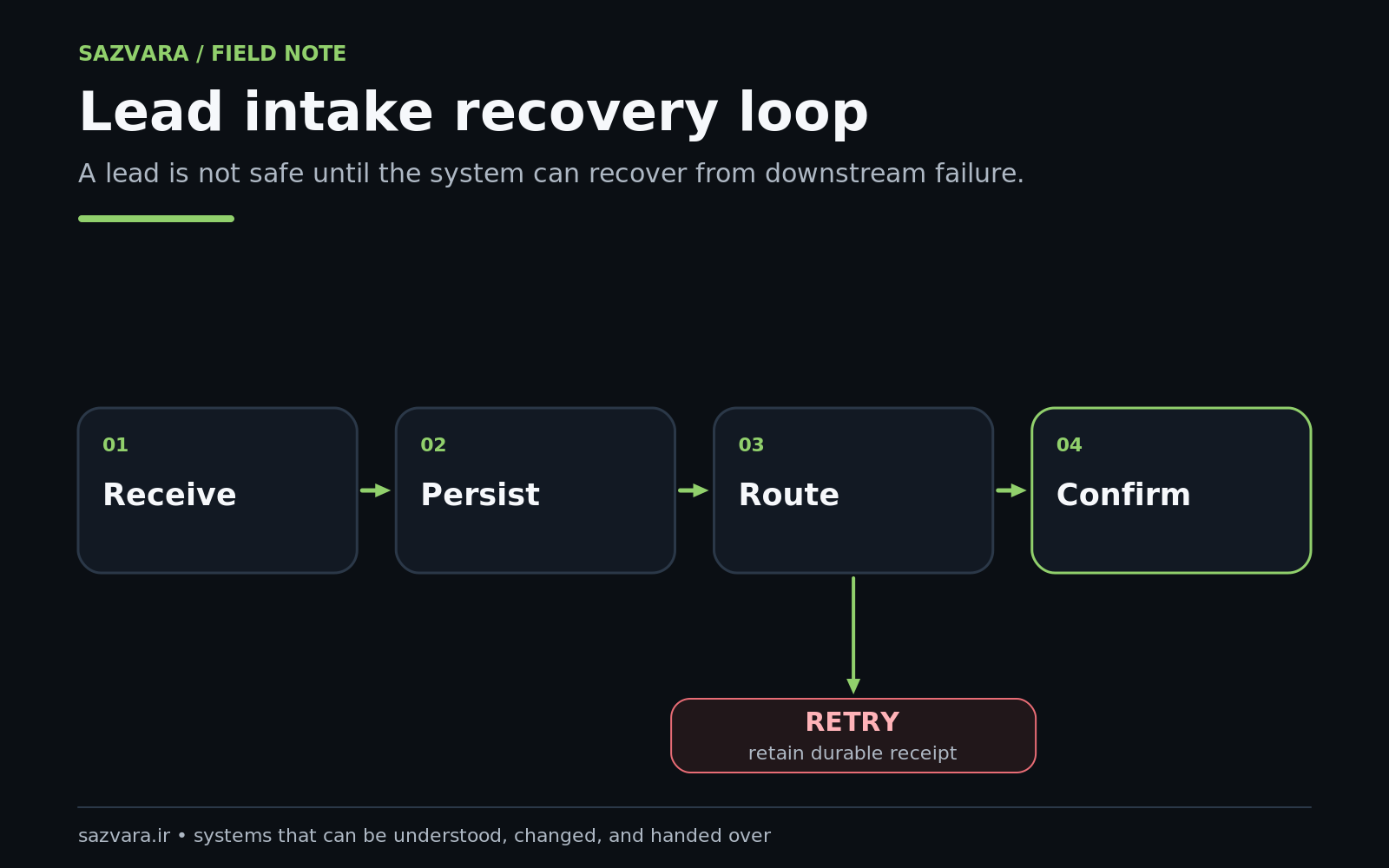
Why do this before CRM creation? Because third-party systems fail. APIs time out. Credentials expire. Rate limits appear. A durable receipt lets the business retry without asking the prospect to resubmit.
Make duplicate submission safe with idempotency#
Visitors double-click. Browsers retry. Webhooks can be delivered more than once. Staff may manually replay failed automation.
A robust intake system therefore needs an idempotency strategy: repeated processing of the same logical submission should not create repeated CRM leads or repeated customer acknowledgements.
Common patterns include:
- generate a server-side submission UUID and persist it;
- store a downstream CRM ID against that UUID;
- reject or merge an exact replay of an already-completed receipt;
- use provider-native idempotency keys when supported;
- separate "retry processing" from "create a new lead."
This becomes especially important when automation platforms expose replay tools. Zapier allows failed runs to be replayed from history and documents limitations around what is replayed (Zapier replay documentation). A replay mechanism is useful only if downstream actions can tolerate it safely.
Route leads with explicit business rules#
After the lead is durable, determine ownership.
Do not build routing around tribal knowledge such as "Sarah usually handles these." Encode the rule.
Examples:
- geography;
- service category;
- account type;
- project value band;
- language;
- existing customer vs new customer;
- partner/referral source;
- product line.
Salesforce assignment rules are a concrete example of this pattern: they can route leads to users or queues based on explicit criteria, including web-generated leads (Salesforce assignment rule guidelines). Salesforce also recommends a default owner or queue so records have somewhere to go even when no rule matches (Set Up Assignment Rules).
That default route matters. "No rule matched" should become a visible queue, not a lost lead.
Worked scenario: agency diagnostic request#
Suppose a visitor requests help with a broken WordPress site.
The system can:
- persist submission
S-2026-09120-1842; - validate contact and website fields;
- create or update the CRM contact;
- create a deal/opportunity tagged
WordPress Rescue; - route to the technical-sales queue;
- notify the assigned owner;
- send an acknowledgement to the prospect;
- start an SLA timer;
- flag the receipt if ownership remains blank after the permitted interval.
Notice that the browser success page is only one event in the sequence.
Notifications are signals, not ownership#
Email, Slack or messaging notifications are useful because humans need to know when work arrives. But a notification is not a durable work queue.
A robust model separates:
record — the authoritative lead; owner — the person/team accountable; notification — the alert that tells the owner to act; SLA — the rule measuring whether action happens in time.
HubSpot's current forms documentation supports triggering actions such as confirmation emails or segment membership after submission, with more advanced workflows available for richer automation (HubSpot form automations). The important design choice is to avoid assuming that sending the alert proves the lead was handled.
Instrument every critical boundary#
A pipeline without logs is difficult to rescue because nobody knows where the lead disappeared.
OWASP notes that application logging provides operational and security insight beyond infrastructure logs alone (OWASP Logging Cheat Sheet). For lead intake, capture enough information to reconstruct processing without logging secrets or unnecessary sensitive content.
Useful events include:
| Event | Minimum evidence |
|---|---|
| submission_received | receipt ID, time, source |
| validation_failed | receipt/request ID, field category, reason |
| durable_write_ok | receipt ID |
| crm_create_attempt | receipt ID, target system |
| crm_create_ok | receipt ID, CRM record ID |
| routing_ok | receipt ID, owner/queue ID |
| notification_ok | receipt ID, channel |
| processing_failed | stage, error class, attempt count |
| recovered | original failure stage, recovery method |
Avoid recording passwords, access tokens or unnecessary raw personal data in logs.
Design failure and retry before launch#
External automation products themselves demonstrate why this matters. Zapier documents replay and autoreplay for failed runs, while its webhook documentation explains rate limits and recommends retry behavior for non-success responses (Zapier webhook rate limits). Make supports error-handling routes and incomplete executions that can preserve failed work for retry or manual resolution (Make error handling, Make incomplete executions).
Those features are not substitutes for system design. The business still needs to decide:
- which errors should retry automatically;
- how long to retry;
- which errors require human review;
- how duplicate effects are prevented;
- when a prospect-facing acknowledgement is safe to send;
- who owns the exception queue.
Measure lead intake like an operating process#
Track more than conversion rate.
Useful operating metrics include:
- valid submissions received;
- durable receipt creation success;
- CRM creation success;
- duplicate rate;
- percentage routed automatically;
- unassigned queue age;
- median time to owner assignment;
- median time to first human response;
- exception count by stage;
- recovery time;
- submissions that received acknowledgement without reaching the system of record.
That final metric should be zero. If the prospect is told "we received your message" while the business cannot find it, the interface is lying about the state of the system.
Protect the pipeline from quiet configuration drift#
Lead systems change constantly. Someone edits a form field. A CRM property is renamed. An API token expires. A routing rule is reordered. An employee leaves. A webhook URL changes.
Build a lightweight change-control process:
- maintain a field mapping document;
- keep test submissions for each important route;
- use dedicated integration credentials rather than a departing employee's personal account;
- review default/unmatched routing;
- monitor failed executions;
- run a synthetic test regularly;
- document how to rotate credentials;
- preserve an emergency manual intake route.
Salesforce's own support documentation shows how small rule changes can cause unexpected assignment behavior (Salesforce assignment troubleshooting). A lead pipeline is software, even when most of it is configured through graphical tools.
The seven-gate release checklist#
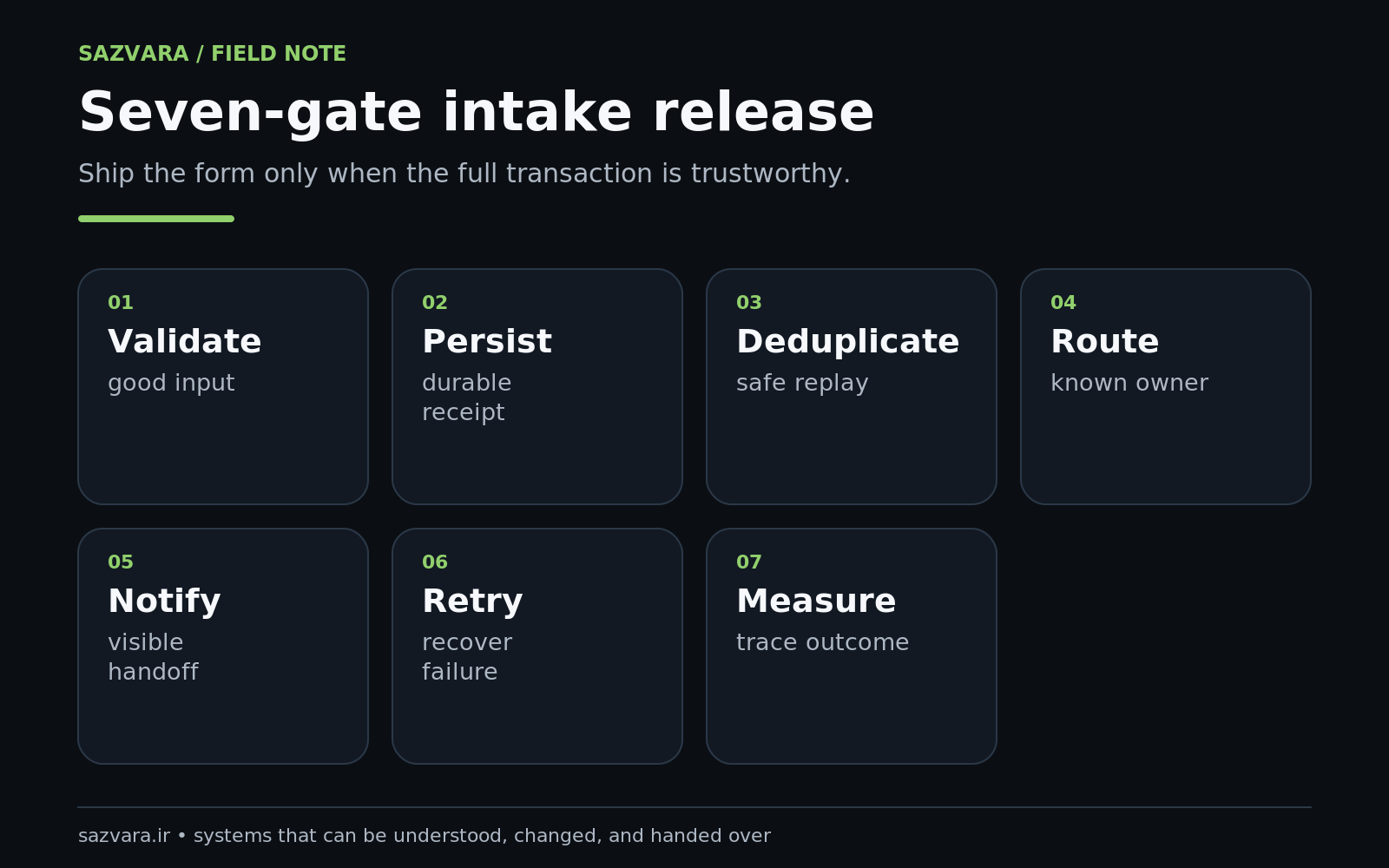
Do not launch a form-to-revenue workflow until it passes these gates:
Gate 1 — usable form#
Labels, instructions, required fields and mobile behavior are clear.
Gate 2 — server validation#
Malformed input cannot bypass browser-side rules and enter downstream systems unchecked.
Gate 3 — durable receipt#
A valid enquiry survives CRM/API downtime.
Gate 4 — duplicate safety#
Retries and double-submits cannot create harmful repeated effects.
Gate 5 — explicit routing#
Every lead gets a valid owner or visible fallback queue.
Gate 6 — observable failure#
The team can identify the failed stage and recover the lead.
Gate 7 — operational response#
The business measures whether someone actually responds to the prospect.
A green workflow run without these controls is not the same thing as a reliable revenue process.
Test the pipeline with synthetic enquiries, not only real customers#
A lead pipeline should be tested when nobody is waiting for a real enquiry to expose the fault. Create one or more synthetic submissions that exercise the same production path without confusing the sales team. For example, use a dedicated test email domain or recognizable company name, mark the record as synthetic, and verify that it reaches the durable store, CRM, routing rule, notification channel and reporting layer.
The test should confirm both success and recovery. Temporarily point a staging integration at an invalid downstream endpoint, verify that the receipt remains recoverable, restore the integration, and replay the work. This proves something materially different from "the form submitted": it proves the business can survive a dependency failure.
Synthetic testing also detects configuration drift. A form builder may rename a field; a CRM administrator may make a field required; a routing rule may stop matching; a token may expire. A regular end-to-end test gives the team an early warning before a prospect becomes the monitoring system.
Design the acknowledgement around truth#
A confirmation page or email makes a promise. Its wording should match the state the system has actually reached.
If the browser receives a success response only after a durable receipt exists, it is reasonable to say the enquiry was received. If downstream CRM routing still happens asynchronously, do not promise that a specific person has already reviewed it. A more truthful acknowledgement is: "We've received your request and will route it to the appropriate team."
This distinction sounds small but it improves operational integrity. The interface should not claim a downstream action that has not yet occurred. When the promise is important—such as appointment confirmation, payment acceptance or regulated intake—the acknowledgement boundary should be even stricter.
Treat privacy and retention as architecture decisions#
A lead form often collects personal information. Avoid copying the full payload into every downstream system merely because the connector makes it easy. Define which fields each destination needs, how long failed receipts are retained, who can access the exception queue and which values should be excluded from logs.
The same principle applies to attachments. If a prospect can upload documents, store them in a controlled location and pass references rather than duplicating files through chat notifications or multiple automation histories. Minimize the number of systems that become long-term custodians of sensitive data.
This is another reason durable receipt should be deliberate: recovery data has a lifecycle. A permanent archive of every failed form payload is not automatically safer than a short-lived, access-controlled recovery store.
The release should prove seven independent gates#
The seven gates below are deliberately independent. A beautiful form can still have unsafe server handling; a reliable CRM integration can still route leads to nobody; perfect routing can still leave failures invisible. Release requires the whole path.
Scenario: the CRM is down for forty minutes#
A prospect submits at 10:05. The website validates the request and writes receipt R-1842. The CRM call times out, so the receipt enters retry_pending; the visitor still receives a truthful message because the business has durably received the request. Automatic retries continue with backoff. At 10:47 the CRM recovers, the existing receipt creates one lead, routing assigns an owner, and the system records the CRM ID against R-1842.
No one asks the prospect to resubmit, and replay cannot create a duplicate because the receipt ID is the idempotency key. That is the difference between a form that sends data and a lead-intake system that owns delivery.
When a simple setup is enough#
Not every small business needs queues and elaborate orchestration.
A low-volume service business may be perfectly well served by:
- accessible form;
- secure server-side validation;
- durable form-submission storage;
- CRM creation;
- owner assignment;
- email notification;
- daily exception check.
Complexity should follow risk and volume. The architecture becomes more elaborate when the business handles valuable leads, multiple teams, high submission volume, regulated data, complicated routing or automated customer promises.
The important part is that even the simple version has a durable record and a recovery path.
Where Sazvara fits#
Sazvara can diagnose an existing form-to-CRM path, identify where enquiries can disappear, and redesign the workflow around durable receipt, routing, observability and recovery. That work may use native CRM automation, WordPress, n8n, Make, Zapier, custom code or a hybrid—the tool follows the operating requirement.
See Sazvara services for automation/rescue work, Sazvara work for engineering context, or request a diagnostic if your website enquiries currently pass through several fragile handoffs.
Sources and further reading#
- W3C Forms Tutorial
- W3C form validation
- W3C labeling controls
- MDN Constraint Validation
- OWASP Input Validation Cheat Sheet
- OWASP Logging Cheat Sheet
- Salesforce assignment-rule guidelines
- Salesforce assignment-rule setup
- HubSpot form automations
- Zapier replay
- Zapier webhook rate limits
- Make error handling
- Make incomplete executions
Editorial note: This article was produced with AI-assisted research and drafting, then reviewed against Sazvara's factual, operational, originality and release-quality controls. Architecture patterns are Sazvara's synthesis; platform behavior and standards are linked to their current documentation.
Have a system that is stuck, manual or difficult to ship?
Sazvara diagnoses the system before prescribing the technology. Bring the constraints, failure modes and current state.